Monday, April 8, 2013

Web 2.0

Downloaded from: http://webbizconsultants.com/social-media/improve-sales/
Is Web 2.0 just another buzz word or is it a tool or better yet, a new mindset that empowers people and really give individuals the ability to change the world?  The term was originally coined at a Media Live conference when discussing the dot com bust that how instead of diminishing, the internet was actually growing in momentum.  The difference? New tools, websites and formats were appearing that no longer needed enormous technical skill to operate. With WYSIWYG (what you see is what you get) technology now available to everyone, anyone can be a publisher.  New tools and a willingness to share underpinned by mutual trust has given the individual the ability to be seen and heard in ways that have never before been possible. With hand held mobile devices with Android and IOS platforms, many commentators have started talking about Web 3.0!
Downloaded from: http://www.taringa.net/posts/info/6675145/Evolucion-de-la-internet.html

As educators, this new range of tools gives us potential to empower our students in a way that chalk and blackboard users would never have dreamed of!  And with a plethora of wikis, blogs and websites to direct us, we can not only use these tools, but match them to learning styles or organise them according to Bloom's Taxonomy!

WebTools4U2Use

Differentiate Teaching and Learning with Web 2.0 Tools

Web 2.0 for Teachers

Web Based Versions of Bloom's Taxonomy

The tools we have been looking at in our course are many and varied and too vast in number to possibly remember, so I have created a Diigo page to archive them:

My Diigo Library


Sunday, April 7, 2013

UNESCO ICT Competency Standards for Teachers

Screen clipping taken: 7/04/2013 12:33 PM

In 1993UNESCO commissioned a report to be drawn up on Education for the Twenty-fist Century, summarized in Learning: the Treasure Within. This report looked world issues, such as poverty, the rights of minorities and women, international co-operation to name but a few and how education can help overcome them. The findings of this report have been refined into The Four Pillars of Education. This report looks at the importance of creation of life-long learners, capable of moving from basic skills to great competence and working collaboratively to create active citizenry. UNESCO has identified the need for greater ICT skills for all educators if we are to meet the educational needs of young people for the 21st century.  To this end they have created a set of guidelines that read as follows:
  • a common set of guidelines that can be used to identify, develop or evaluate learning materials or teacher training in the use of ICT in teaching and learning
  • identify a basic set of qualifications that allows teachers to integrate ICT into their own teaching and learning that will help advance student learning and their own professional abilities
  • advance teacher's skills in pedagogy, collaboration, leadership and innovative school development using ICT
  • develop a common language for the use of ICT in teacher education (UNESCO, 2008, p. 5)

This UNESCO ICT Competency Standards for Teachers Project is based in a greater policy context to encourage educational reform and sustainable development internationally.  It endeavours to show that education should be a central function of all nations and should address the following goals:
  • instilling core values and cultural heritage
  • aiding the growth and development of all people
  • encouraging democratic process and active citizenship especially for females and minority groups
  • the promotion of cross-cultural understanding
  • the peaceful resolution of conflict
  • the improvement of health care and the welfare of individuals
  • scaffolding the economic development of nations to reduce poverty and encourage general prosperity (UNESCO, 2008, p. 6)
Bibliography:

International Committee on Education for the 21st Century. (n.d.). Learning: the treasure within. UNESCO.

UNESCO. (1999). The four pillars of education. Retrieved from UNESCO task force on education for the twenty-first century: Retrieved from: http://www.unesco.org/delors/fourpil.htm

UNESCO. (2008). ICT competency standards for teachers. Paris: United Nations Educational, Scientific and Cultural Organization. Retrieved from: http://www.unesco.org/delors/delors_e.pdf

Saturday, April 6, 2013

Timelines

Copied from:
http://vrroom.naa.gov.au/records/?ID=19541
Looking at all of the Group Four tools, while I can see great value in all of them, it is the Web 2.0 timelines that I feel would be most useful to me in the lower to middle primary school environment. There are many online timelines, each offering slightly different functions, but all are basically graphic organisers that can be used as a visual tool for inquiry learning. They can be used to look chronologically at family history, student biographies or history topics that may span centuries. Timelines offer much to a variety of learning styles, but particularly the visual, mathematical and kinaesthetic intelligences. By using timelines, research tells us that students get a better understanding of the chronology of events and help them situate the people, places and dates they have learned about. It will also help activate prior knowledge. Seeing the information visually also helps students grasp the concepts of cause and effect between events (Fillpot, 2013).

I originally planned to use Dipity, but for whatever reason, I could not get anything to upload to it. I tried different browsers, different computers and even an iPad, but it did not like me! Which just goes to show that when using ICT it does always pay to have a plan B, e.g. sheets of paper, markers and rulers to make a more traditional timeline!

So, I used Tiki Toki to make my timeline. It did not have all of the same features as Dipity, such as being able to embed video and audio, but maybe that saved some viewers from 'attention blink' due to cognitive overload (Stansbury, 2008)! Options for creativity still exist as different templates can be used and pictures uploaded.  Creating a timeline, is also a good way to discuss the purpose and legalities of copyright and the use of tools such as the Creative Commons and Flickr.

For older users I would also recommend Fake Book.  While not strictly a time line, it does allow for the sequential addition of information in the format of FaceBook. This has the added bonus of giving ample opportunity for the teaching of online etiquette in a controlled environment.

Here is my finished Tiki-Toki product (well, work in progress!)

Ned Kelly

Bibliography


Fillpot, E. (2013). Teaching with timelines. Retrieved April 6, 2013, from Teaching History.org: http://teachinghistory.org/teaching-materials/teaching-guides/24347

Stansbury, M. (2008, March 26). Analysis: How multimedia can improve learning. Retrieved March 24, 2013, from eSchool News: http://www.eschoolnews.com/2008/03/26/analysis-how-multimedia-can-improve-learning/


Friday, April 5, 2013

Learning Principles for Multimedia

Copied from:http://www.e-learn.nl/2012/12/16/do-we-need-another-mooc
While looking though our readings on multimedia in learning, I have been stuck by several important ideas.  Short-term memory is limited to around 4 objects at a time in spatial or visual memory with around 7 objects in verbal memory.

Sensory memory degrades very quickly and the more sensory input there is the greater the risk of overload, thus limiting long-term memory.   However, research shows that convergence (sensory input combined with new information) can have positive effects on the creation of long-term memory and the human capacity for long-term memory is virtually unlimited.

I thought that I would compile a list, based on empirical research, of the ways that multimedia can  help students learn when used correctly:

·         multimedia principle: words and pictures help knowledge retention

·         spatial contiguity principle: having words and pictures next to each other rather than on separate pages works best

·         temporal contiguity principle: words and pictures work best together when presented simultaneously

·         coherence principle: unnecessary words and pictures should be excluded

·         modality principle: animation and narration work better than animation with text embedded in it

·         individual differences principle: low-knowledge learners benefit from more design effects, while high-knowledge learners require less

·         spatial learners benefit from design effects

·         with more complex material, increasing the direct manipulation will help increase of knowledge gained (Stansbury, 2008)
Bibliography

Stansbury, M. (2008, March 26). Analysis: How multimedia can improve learning. Retrieved March 24, 2013, from eSchool News: http://www.eschoolnews.com/2008/03/26/analysis-how-multimedia-can-improve-learning/

Thursday, April 4, 2013

Blogs in the Classroom

Educational Blogging from:
http://net.educause.edu/ir/library/pdf/ERM0450.pdf
As Education Queensland and the New Australian Curriculum both call for the use of ICTs to create quality learning experiences for 21st century learning, it is imperative that all teachers increasingly look towards improving their digital pedagogy (Queensland Department of Education, Training and Employment, 2013). This should include tools that can let students inquire, create, communicate, operate with ICT as well as give opportunities for learning about the ethics and issues of the online environment as indicated in the general capabilities of the Australian Curriculum (General capabilities in the Australian Curriculum, 2013, pp. 49-50).  Blogging has the ability and flexibility to meet all of these needs. After trying several of the group one digital tools (Weebly and Wikispaces) I decided that a blog would be the quickest and easiest one for me to start with in the classroom. As class groups can be created in Blogger to keep students safe and secure while online and having used it before, I opted for this particular blog.

Using blogging in the classroom can have many advantages and possible draw backs as I noted in a previous blog post where I conducted a SWOT analysis. This can be viewed here: Creating a Blog.  However, most of the negatives can be easily overcome with appropriate scaffolding.

If, for example, one was to create a blog for a year three class the following considerations would have to be met:
  • Safe secure environment
  • Adequate instruction to students on ICT skills required
  • Engaging activities such as the creation and embedding of multimodal tools
  • Suggested websites if research is required
  • Suitable  age appropriate picture, video and audio sources
  • Cybersafety
  • Explanation of copyright and Creative Commons sources
  • Permission from parents or guardians if images of students are to be published
  • Age appropriate responsible ICT use agreement between students and school (Department of Education and Children's Services, 2009)
In a blog students can have both monologue and dialogue, working individually or collaboratively (O’Donnell, 2006, p. 8). Brainstorming can begin in a blog and they can they can then link to and add information that they find. Cross curricular activities can be created, e.g. a blog on a science experiment may cover science, English, visual art and media studies. Assessment can be built into blog tasks via quizzes or assignments. Students can follow the blogs of experts and gain real-world experience. Widgets can be added and a variety of multimodal tools catering to all learning styles and literacy levels can be embedded, e.g. Voki, soundfiles, You Tube clips or add their own movies, thus enabling students to present their finished work in the blog.  Having the possibility of a worldwide audience often inspires students to see the importance of their own work. Feedback can also be given by both student and teacher in a blog, thus enabling the deep learning cited in Bloom’s Taxonomy.
Downes cites many reasons as to the benefits of blogging in the classroom which I have mentioned in an earlier blog post: Benefits of Blogging in the Classroom (Downes, 2004)

Blogs must guide to writer to reflective analysis and cannot be just a way of delivering instruction. Above all, blog activities must meet TPACK requirements, that is, through the combination of content knowledge, pedagogical knowledge and ICT knowledge create real world learning to guide students to the highest levels of Bloom’s Taxonomy and become lifelong learners for the 21st century.
There are many examples of great blogs in primary schools.  Here is one:

4KM and 4KJ @Leopold Primary School

Bibliography:


General capabilities in the Australian Curriculum. (2013, January). Retrieved March 30, 2013, from Australian Curriculum, Assessment and Reporting Authority: http://www.australiancurriculum.edu.au/GeneralCapabilities/Pdf/Overview

Downes, S. (2004, September/October). Educational Blogging. Retrieved March 6, 2013, from EDUCAUSE Review: http://www.educause.edu/ero/article/educational-blogging

O’Donnell, M. (2006). Blogging as pedagogic practice: Artefact and ecology. Asia Pacific Media Educator, 17, (5-19).

Queensland Department of Education, Training and Employment. (2013). Digital pedagogy. Retrieved April 2, 2013, from Smart Classrooms: http://education.qld.gov.au/smartclassrooms/developing-professionals/elearning-frameworks/index.html

Productive Pedagogy

Pedagogy is the art of teaching: that is the interaction between the teacher and the student and the resultant learning. Productive pedagogies are those that result in the best learning outcomes and should include:

  • deep knowledge through higher order thinking
  • collaborative learning where dialogue is imperative
  • enabling student to discover their learning styles
  • real life learning through problem-based, inquiry learning
  • relevant to students lives and cultures
  • students can be in control of their learning
  • engages students
  • supports individual students group identity and their development as an active citizen

Productive Pedagogies from GerryC


Bibliography
Fasso, W. (2013, February 21). What is pedagogy? EDED20491 ICTs for Learning Design.

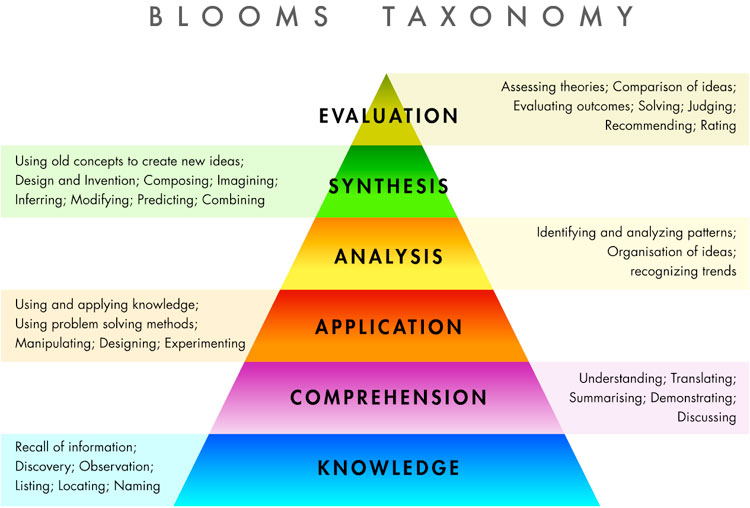
Bloom's Taxonomy

From: http://juliaec.files.wordpress.com/2011/04/blooms_taxonomy.jpg

In education it is essential that a system or taxonomy is used to classify the evaluation processes and educational objectives (Veal & MaKinster, n.d.). Bloom's taxonomy is the most widely used in education as it was created to give educators and researchers a common language in which to discuss curriculum and evaluation.

This taxonomy refers primarily to Bloom's Cognitive Domain and it is important for educators to recognise the differences between simple knowledge such as observing, listing, naming and the higher order thinking skills required for assessing, analysing, comparing or judging.  This will not necessarily be a linear process but one where the student will use and grow his own knowledge by using opportunities offered in his learning to hone his higher order thinking skills.

When looking at tertiary education, it does well to use Bloom’s taxonomy to see the level of thinking that is required to complete assigned tasks.  If we look at the table above, noting that the bottom level of the table, knowledge is one and the top is six, we need to understand that university level assessment should require student to perform at the third level and above (Chapman, 2008). 
Bibliography


Chapman, L. (2008). Curriculum mapping: The aligned curriculum. Retrieved April 1, 2013, from University of New England: http://www.une.edu.au/gamanual/staff/the_aligned_curriculum.pdf


Veal, W. R., & MaKinster, J. G. (n.d.). Pedagogical content knowledge taxonomies. Retrieved March 12, 2013, from College of Education: University of Nevada: http://wolfweb.unr.edu/homepage/crowther/ejse/vealmak.html